Researched from verified Amazon reviews, expert tech sources, and manufacturer specs
Updated July 202611 min read
As an Amazon Associate, This Will Fix It earns from qualifying purchases at no extra cost to you. Recommendations in this article are based on verified Amazon reviews, expert tech sources including PCWorld, Tom’s Guide, and PCMag, and manufacturer specifications — not personal product testing.
2 min
Average Alexa setup time once plug is in Wi-Fi
$20
Price per plug for the top-rated Kasa KP125M (2-pack)
15A
Max load rating on top picks — handles most home appliances
Best for most buyers — start here
Kasa KP125M — Matter + Energy Monitoring Smart Plug
The most consistently recommended smart plug for Alexa by expert review outlets including PCWorld, Tom’s Guide, and PCMag. Matter certified — works with Alexa, Google Home, and Apple Home. Built-in energy monitoring tracks real-time wattage and 30-day history. Compact 1.5-inch design fits two plugs in one outlet without blocking the second socket. 15A/1800W load rating handles most appliances. Available in 2-pack and 4-pack on Amazon.
Matter certifiedEnergy monitoringPCWorld top pick2-pack value
Problem
Lights left on, coffee maker you have to walk to, standby power draining your electricity bill, and the daily “did I leave it on?” anxiety when you leave the house.
Fix
A $20 smart plug that lets Alexa control any outlet with voice commands, schedules, and routines — no electrician, no wiring, no permanent changes to your home.
Relief
Coffee starts before you get to the kitchen. Lights turn off when you say goodnight. Away-mode routines handle the rest. Your home starts working for you instead of against you.
What a Smart Plug Actually Does — and Why Alexa Makes It Better
A smart plug is an adapter that goes between a wall outlet and whatever is plugged into it — a lamp, a coffee maker, a fan, a charger — and gives you on/off control over that device from the Alexa app or by voice command. It does not make the device itself smart. It makes the outlet smart. The device plugged into it can be completely ordinary — a $15 lamp bought at any hardware store becomes an Alexa-controllable smart lamp for the price of a smart plug.
What makes Alexa integration valuable is the routine system. A single “Alexa, goodnight” command can turn off six different plugs, dim connected lights, and lock a smart door in one phrase. A morning wake-up routine can start the coffee maker at 6:30 a.m. on weekdays without touching anything. An away routine can shut off every non-essential device automatically when the household leaves. These are not features that require smart bulbs or smart appliances — they run entirely through the plug, and any ordinary device benefits from them.
The six picks below cover every Alexa smart plug use case — best overall, energy monitoring, simplest setup, and best budget option. The comparison table below explains the key differences in plain language before the product cards go deeper.
Which Smart Plug Is Right for Your Situation?
If you want
Best all-around plug — works with everything
→ Kasa KP125M (Matter + energy monitoring)
If you want
Absolute simplest Alexa setup — no extra app
→ Amazon Smart Plug (Alexa-only, 2-minute setup)
If you want
Energy monitoring on a budget
→ Kasa KP115 (no Matter, but great energy data)
If you want
Detailed power usage tracking per device
→ Tapo P110M or Emporia Smart Plug
If you want
Future-proof: works with Alexa, Google, Apple
→ Any Matter-certified plug (KP125M is top pick)
If you have
Wemo Thread plug that won’t connect to Alexa
→ Replace with KP125M — Wemo Thread is HomeKit-only
Emporia states 10A max continuous load, 15A peak up to 1 hour per day — check your appliance label before use. Load ratings and compatibility verified from manufacturer product pages and Amazon listings.
Pick #1: Kasa KP125M — Best Smart Plug for Alexa Overall
Kasa KP125M — Matter Smart Plug + Energy Monitoring
~$40 for 2-pack (~$20 per plug)
The Kasa KP125M is consistently rated the best smart plug for most homes by expert review publications in 2026. Matter certification means it pairs natively with Alexa, Google Home, Apple Home, and SmartThings — scan the QR code on the plug in any Matter app and it connects without the Kasa app if you prefer. Energy monitoring tracks real-time wattage, daily totals, 30-day history, and can estimate monthly cost based on your electricity rate. The 1.5-inch compact design fits two plugs in a single duplex outlet without blocking the second socket — a practical feature that matters when using multiple plugs on a power strip. 15A/1800W rating handles space heaters, window AC units, and most high-draw appliances. UL and ETL certified. PCWorld noted TP-Link “was one of the first to go all-in on Matter, and it shows.”
Matter certifiedEnergy monitoringCompact 1.5″PCWorld top pickUL / ETL listed
Works with Alexa, Google Home, Apple Home via Matter
Energy monitoring — real-time watts, 30-day history, cost estimates
1.5″ wide — two plugs fit in one outlet without blocking
15A/1800W — handles most high-draw appliances safely
Top-rated by PCWorld, Tom’s Guide, and PCMag in 2026
Watch-outs
2.4GHz Wi-Fi only — 5GHz not supported
Matter setup can occasionally stall when pairing across multiple platforms simultaneously
No Thread support — relies on Wi-Fi router signal
Tip: When setting up the KP125M with Alexa for the first time, use the QR code printed on the plug and scan it directly in the Alexa app under Devices → + → Matter Device. This skips the Kasa app entirely and completes setup in under 2 minutes. If setup stalls, make sure your phone is on 2.4GHz Wi-Fi during pairing — many modern phones prefer 5GHz automatically.
Pick #2: Amazon Smart Plug — Easiest Alexa Setup, No Extra App
Amazon Smart Plug — Works with Alexa
~$25
The simplest smart plug setup available for Alexa users — say “Alexa, set up my smart plug” and it walks you through the entire process by voice, no phone needed. Works exclusively with Alexa (no Google or Apple compatibility). No energy monitoring. 15A/1800W load rating. Compact enough for most standard outlets. The right choice if you are fully in the Amazon ecosystem and want the absolute fastest path from box-to-working. Reviewers consistently describe setup as “two minutes total.” Not the right choice if you might add Google Home or Apple Home devices in the future — for that, get a Matter plug.
Voice setup via AlexaNo app download needed15A ratedAlexa ecosystem only
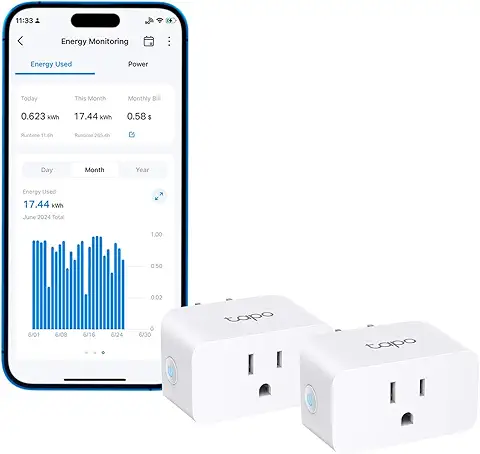
Pick #3: Tapo P110M — Matter + Energy Monitoring at a Lower Price
TP-Link Tapo P110M — Matter + Energy Monitoring
~$25 per plug (2-pack)
The Tapo P110M offers the same core combination as the KP125M — Matter certification plus energy monitoring — at a slightly lower per-plug price. Rated 4.6 stars on Amazon across thousands of verified reviews. Works with Alexa, Google Home, and Apple Home via Matter. Tracks real-time watts, daily consumption, and monthly estimates. Trusted Reviews rated it highly for energy tracking accuracy and app clarity. A solid alternative to the KP125M if the price difference is meaningful, with comparable specs and similar compact design.
Pick #4: Emporia Smart Plug — Most Detailed Energy Data
Emporia Smart Plug — Granular Energy Monitoring
~$35 per plug (4-pack)
The Emporia Smart Plug offers the most granular energy data of any plug on this list — real-time wattage, daily and monthly consumption totals, historical trends, and detailed breakdowns by device type. Rated highly by Engadget and PCWorld specifically for energy monitoring depth. Works with Alexa and has solid scheduling features. Not Matter certified. Important: rated for 10A continuous load, 15A peak for up to 1 hour per day — check your appliance’s label before connecting anything over 10A continuously. Best for buyers who want to find the specific appliances costing the most electricity and create data-driven automation decisions.
Best energy data4-pack valueEngadget pick10A continuous rated
Watch-out — Emporia load rating: The Emporia Smart Plug is rated for 10A max continuous load (not 15A). For appliances that run continuously — refrigerators, dehumidifiers, space heaters — check that the device draws under 10A (1200W) continuously. The 15A peak rating only applies for up to 1 hour per day. For high-draw continuous loads, use the Kasa KP125M instead.
Pick #5: Tapo P125M — Smallest Matter Plug, No Monitoring Needed
Tapo P125M — Compact Matter Plug (No Energy Monitoring)
~$22 per plug (2-pack)
The most affordable Matter-certified smart plug on this list. Ultra-compact — even smaller than the KP125M. Works with Alexa, Google Home, and Apple Home. No energy monitoring — this is the right pick if you just want Matter compatibility and basic on/off scheduling without paying for energy data you won’t use. PCWorld rates it highly as the best Matter-only option when energy tracking isn’t a priority. Good for lamps, fans, diffusers, and any device where you want voice control and scheduling without consumption analysis.
Pick #6: Kasa KP115 — Best Budget Pick With Energy Monitoring
Kasa KP115 — Energy Monitoring Smart Plug (Budget Pick)
~$15 per plug (2-pack)
The Kasa KP115 is the best budget option for Alexa users who want energy monitoring without paying for Matter certification. Not Matter certified — works with Alexa and Google Home through the Kasa app but not via direct Matter pairing. Energy monitoring tracks real-time usage and daily totals. 15A/1800W load rating. Compact slim design. Thousands of verified Amazon reviews with consistently high ratings for app reliability and energy data accuracy. If you are Alexa-only and don’t need Matter compatibility with other platforms, the KP115 gives you most of the KP125M’s practical functionality at a lower price.
Best budget pickEnergy monitoring15A ratedNo Matter (Alexa + Google)
Turns off all smart plugs, dims any connected lights, and confirms everything is off in one command. Eliminates the “did I leave it on?” anxiety.
“Alexa, goodnight” → Off: Living Room Lamp, Desk Light, Coffee Maker, TV
☕
Morning Wake-Up Routine
Turns on the coffee maker at a scheduled time — weekdays only, or weekends at a later time. Coffee is ready when you walk into the kitchen.
Scheduled 6:30 AM Mon–Fri → On: Coffee Maker Plug
🏠
Away Mode Routine
Shuts off all non-essential devices when you leave. Cuts standby power draw. Eliminates the need to mentally check each device before walking out the door.
“Alexa, I’m leaving” → Off: all plugs except fridge and router
🔒
Security Simulation
Turns lamps on and off at randomized intervals between sunset and 11 PM when you’re away. Makes the house look occupied from outside.
Sunset routine → random intervals → On/Off: Living Room Lamp until 11:00 PM
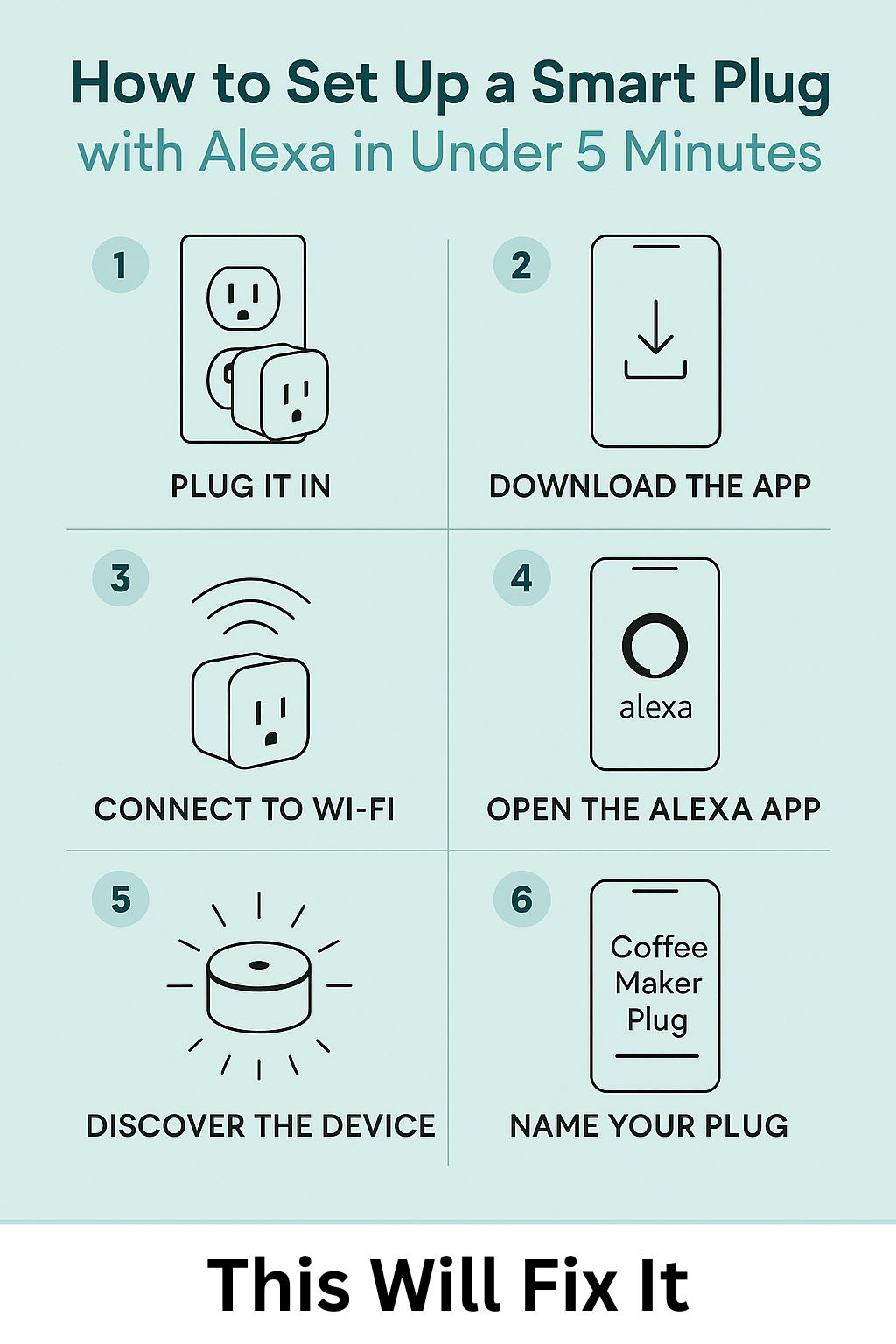
How to Set Up a Smart Plug with Alexa in Under 5 Minutes
1
Plug in and power on near your router
Insert the smart plug into a wall outlet within range of your Wi-Fi router for initial setup. The LED will blink to indicate pairing mode. For Matter plugs, the QR code on the plug is all you need for the next step.
2
Open the Alexa app or the manufacturer app
For Matter-certified plugs (KP125M, P110M, P125M): open the Alexa app, go to Devices → + Add Device → Matter Device → scan the QR code on the plug. No separate app needed. For non-Matter plugs: download the brand app first (Kasa Smart, Tapo, or Amazon Alexa for Amazon plugs), then add to Alexa from there.
3
Connect to 2.4GHz Wi-Fi
All smart plugs on this list use 2.4GHz Wi-Fi only. If your router broadcasts a combined 2.4/5GHz network on one SSID, temporarily connect your phone to the 2.4GHz band during setup. Most modern plugs use Bluetooth to simplify this — they pair via Bluetooth first, then connect to Wi-Fi without manual band selection.
4
Name the plug specifically
Use a clear device-specific name — “Coffee Maker,” “Bedroom Lamp,” “Living Room TV” — not “Smart Plug 1.” Alexa uses the name for voice commands, so “Alexa, turn on the Coffee Maker” only works if the plug is named exactly “Coffee Maker.” Rename any existing plugs with vague names before building routines.
5
Create your first Alexa routine
In the Alexa app go to More → Routines → + to create a new routine. Start with the Goodnight routine: trigger phrase “Alexa, goodnight,” then add the action “Smart Home → Control Device → [your plug name] → Off” for each plug you want to include. This is the routine that most buyers say makes the biggest immediate difference in daily life.
6
Check energy monitoring data (if applicable)
For plugs with energy monitoring (KP125M, KP115, P110M, Emporia), open the brand app after 24 hours to see your first day of consumption data. Look for devices drawing significant power in standby — game consoles, desktop computers, and older TVs are common offenders. Setting an auto-off schedule for these is the fastest way to see a measurable reduction in standby energy use.
Safety watch-out: Use only UL or ETL certified smart plugs — all six picks above are certified. Never daisy-chain smart plugs or extension cords together. Stay within the rated load — 15A maximum for most plugs on this list. For space heaters and window AC units, confirm the device’s startup current (inrush) doesn’t exceed the plug’s rating — if the plug trips repeatedly under high-draw appliances, it’s operating at the limit of its rated capacity.
Related fix: If you’re building out a smart home and want to automate your lighting alongside smart plugs, our guide to best smart lighting solutions 2026 covers Philips Hue, Kasa smart bulbs, motion sensors, and LED strips — with honest subscription cost breakdowns before you buy.
Common Questions About Smart Plugs for Alexa
The Kasa KP125M is the best smart plug for Alexa in 2026 for most buyers. It is Matter certified, works with Alexa, Google Home, and Apple Home, has built-in energy monitoring, a compact design that fits two plugs in one outlet, and a 15A/1800W load rating. It is consistently rated the top pick by PCWorld, Tom’s Guide, and PCMag. For buyers who want the absolute simplest Alexa setup with no other platform needed, the Amazon Smart Plug is the easiest option.
Matter is a universal smart home standard that lets devices work directly with Alexa, Google Home, Apple Home, and SmartThings without needing separate apps or bridges. You do not need Matter for Alexa — non-Matter plugs like the Amazon Smart Plug and Kasa KP115 work perfectly with Alexa. The advantage of Matter is future-proofing: if you ever add Google or Apple devices to your home, a Matter plug will work with those too without replacement.
It can, if you use scheduling and energy monitoring to reduce standby power draw. Chargers, game consoles, and TVs draw power even when not in use — energy monitoring plugs like the Kasa KP125M and Tapo P110M show you exactly how much each device is consuming. Setting an automatic off schedule overnight for devices that don’t need to stay on is the most reliable way to see savings. Results vary depending on which devices you target.
Most smart plugs require a 2.4GHz Wi-Fi connection for initial setup and for remote control from the Alexa app. Once set up, some Matter-certified plugs can run local Alexa routines without cloud connectivity. App-based remote control from outside your home requires an active internet connection. Voice commands on the local network generally work even if the internet is temporarily down.
Only if both the smart plug and the heater are within the rated load — typically 15A and 1800W for most plugs on this list. Most common space heaters run at 1500W (12.5A), which is within the 15A rating of plugs like the Kasa KP125M and Amazon Smart Plug. Always check the label on your specific heater. Note the Emporia plug is rated for 10A continuous load — avoid using it with space heaters that run continuously.
Newer Wemo Thread models are HomeKit-only and do not support Alexa. If you have a Wemo Thread plug and want Alexa compatibility, you will need to replace it with a Matter-certified or Alexa-certified alternative. The Kasa KP125M is the most direct replacement — same compact size, adds energy monitoring, and works with both Alexa and Apple Home.
Researched from verified Amazon reviews, PCWorld, Tom’s Guide, PCMag, and manufacturer specifications
This article is based on expert review aggregation, verified Amazon buyer reviews, and manufacturer technical specifications — not personal product testing of smart plugs. All compatibility and load rating claims are sourced from manufacturer product pages and confirmed expert reviews. Read more about Scott’s approach →
Ready to make your outlets smart?
Start with the Kasa KP125M — the plug most expert sources recommend for Alexa in 2026. Matter certified, energy monitoring included, two plugs in one outlet without blocking.